
Official MN State Fair App
Official Minnesota State Fair AppEvents
3.943.00 Reviews
- Version
- 3.0.4
- Installs
- 50.00K
- Age Rating
- Everyone
Screenshots
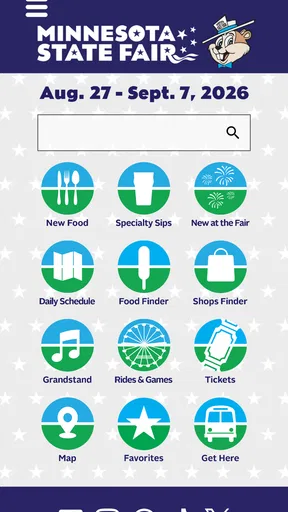

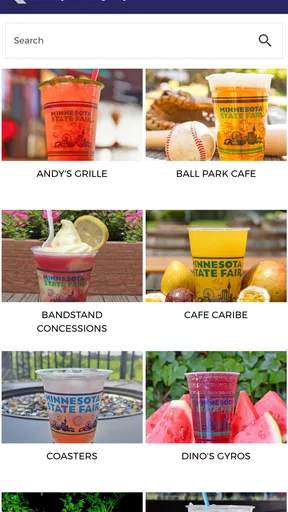
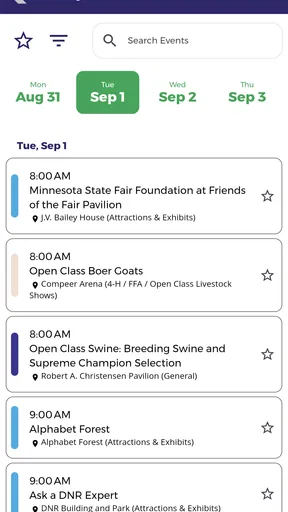
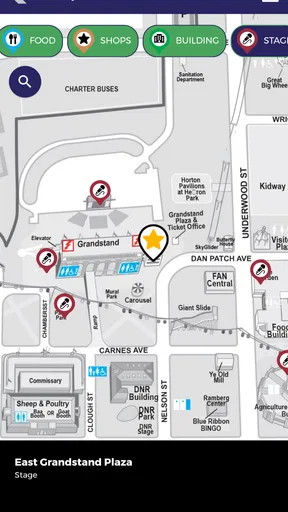
Our Review of Official MN State Fair App
 Analysis by Appyee
Planning a visit to the Minnesota State Fair can become surprisingly complicated once you start juggling food stops, shopping, entertainment, schedules, and the simple question of where you are standing. I found the Official MN State Fair App useful because it puts the fair’s main planning needs in one place instead of making me jump between printed material, browser searches, and memory. It is a free events app from Official Minnesota State Fair App, rated for Everyone, and it is aimed at visitors who want a practical companion before and during a day at the fair.
My overall impression is positive, with one important qualification: this is best understood as a fair-day organizer, not a complete replacement for every other tool on a phone. Its value comes from reducing small decisions. I can think about what I want to eat, which shops or entertainment areas interest me, and how to organize the day without treating the fairgrounds like a puzzle I have to solve from scratch.
How the current app fits into a fair visit
The app’s focus is clear from the moment I use it. It is built around finding foods, drinks, shops, entertainment, and other fair attractions. That makes it especially helpful for people visiting with a loose list of priorities rather than a strict hour-by-hour itinerary. I would use it differently for a quick evening visit than for a full family day, but in both cases the same central idea works: decide what matters most, then use the app to keep the visit moving.
For a first-time visitor, the biggest benefit is orientation. Large fairs can feel less like a single destination and more like a collection of neighborhoods. A person may know they want a particular snack or performance but have no idea what else is nearby. An app dedicated to this event is more useful than a general map because it frames the grounds around fair activities rather than streets, businesses, or unrelated landmarks.
I also like that the app serves both planning styles. Someone who enjoys preparation can browse before leaving home and build a mental route around food, shopping, and entertainment. Someone who prefers to wander can open it only when a decision comes up. That flexibility matters because a fair visit rarely follows the original plan perfectly. A long line, a tired child, changing weather, or an unexpected performance can quickly make a rigid schedule impractical.
A realistic example is a group arriving in the morning with three different goals: one person wants to try food, another wants to browse shops, and someone else mainly cares about entertainment. Instead of walking until each person loses patience, I would use the app to identify a reasonable first area, choose a nearby activity, and leave room for discoveries. The app does not remove the crowds or walking, but it can make the choices feel less random.
Useful before leaving home
Before visiting, I would spend a few minutes making a short priority list rather than trying to catalog the entire fair. I might choose two food targets, one shopping stop, and one entertainment option. That approach prevents the common mistake of filling the day with too many destinations. The app is more effective when it supports decisions than when it becomes another source of endless browsing.
One of my favorite practical uses is comparing wants with available time. If I only have a few hours, I can focus on the items I would genuinely regret missing. If I have the whole day, I can use the same information more loosely and keep a few open spaces for unplanned stops. This is a small distinction, but it changes the app from a directory into a planning aid.
It is also worth preparing for the app to be a reference tool rather than assuming it will manage every part of the visit automatically. I would still make sure my phone is charged, keep a backup idea of where to meet companions, and avoid relying on a single screen for every decision. Those habits are sensible at any crowded event, and they become more important when a group separates or a device becomes difficult to use in bright outdoor conditions.
What changed with the current release
The current version is 3.0.4, and the app was released on July 24, 2024. Those details suggest a relatively recent product stage rather than an old utility that has simply been left untouched. I cannot treat a version number as proof that every part of the experience is perfect, but it does give existing users a useful point of reference when deciding whether an update is worthwhile.
For someone who used an earlier edition, the sensible expectation is a more current foundation for navigating the fair’s information. I would update before a visit rather than opening an older installation and assuming its content is still the best guide. Event apps have a special problem: their usefulness depends heavily on timely organization, so an older version can be less helpful even when it still opens normally.
New users do not need to understand the app’s history to benefit from it. The important point is that the present release is the one to evaluate. I would install it ahead of the visit, explore the categories while I have a comfortable internet connection, and decide how much information I actually want to use. That small preparation makes the first opening at the fair faster and less stressful.
The app has reached over 50 thousand installs and carries a 3.9 average from 91 ratings, with 43 written reviews. I read that combination as evidence of a useful but not universally smooth experience. It is established enough that many visitors have tried it, yet the rating also tells me not to promise a flawless companion. In practical terms, I would recommend testing the navigation and browsing flow before the busy day rather than discovering its quirks while standing in a crowded walkway.
What existing users may notice
People returning from an older version may appreciate having a more current starting point for the fair’s attractions and planning categories. The update is most meaningful when it helps them spend less time searching and more time deciding. I would not reinstall solely because a version number sounds newer, but I would make sure my copy is current before attending, especially if I depend on it for a specific food, shop, or entertainment plan.
Returning visitors may also need to adjust their habits. A person who already knows the fairgrounds might use the app only for new priorities, while a newcomer may need it for broad orientation. The same tool therefore has different value depending on experience. Familiar visitors should avoid letting the app replace their own knowledge of walking distances and meeting places; first-time visitors should avoid assuming that seeing an attraction in a list means reaching it will be quick.
Another useful change in behavior is to review the app as a group before arriving. If everyone chooses their own must-see item, the day can become a series of negotiations. I would instead agree on a small shared plan, then allow each person some personal time. The app supports that conversation because it gives the group a common reference point, even if it cannot settle every disagreement about what to eat or where to go next.
Where the experience still has limits
The main limitation is that an event guide cannot control the physical reality of the fair. Crowds, lines, noise, weather, and walking fatigue remain. A neatly organized screen may make an attraction look easy to reach, but the actual visit can still involve detours and delays. I see the app as a way to make better choices, not as a promise that the day will run on schedule.
I would also be cautious about depending on it as the only source of navigation for a large group. If a friend becomes separated, a prearranged meeting point is more reliable than sending vague messages based on whatever appears on a screen. Likewise, visitors with accessibility needs, young children, or limited stamina should make decisions based on their own comfort and allow extra time. The app can support planning, but it cannot replace personal judgment about the physical demands of the grounds.
Another trade-off is attention. Browsing every category can become its own distraction, particularly when the fair offers more possibilities than one day can accommodate. I found the app most helpful when I used it selectively. A short list of priorities creates freedom; a complete list can create pressure. If you prefer spontaneous visits and dislike planning, the app may feel unnecessary or even slightly overwhelming.
It is also not the right choice for someone looking for a general-purpose city guide. A standard map or broader events service may be better when the day includes destinations outside the fair. Those tools are more suitable for coordinating transportation, restaurants away from the grounds, or a wider trip itinerary. The Official MN State Fair App is more specialized, and that specialization is its strength only when the fair itself is the center of the plan.
Practical ways to get more from it
My first tip is to separate “must do” from “nice if nearby.” I would create the first group before opening every category, then use the app to arrange the second group around it. This prevents a tempting shop or snack from pushing the most important part of the visit out of reach. It also makes the app useful for families, because each person can contribute one priority without turning the day into a contest.
My second tip is to plan by clusters rather than by isolated attractions. If several interests appear to fit naturally into one stretch of the grounds, I would treat them as one outing. That reduces backtracking and saves energy, even when the app does not make a complete route for me. The insight here is that the app’s value is not only in finding individual places; it is in helping me think spatially about a day that could otherwise become a series of long walks.
Third, I would use it as a reset button during the visit. When a line is too long or the group has lost interest in the next stop, I would return to the app and choose a nearby alternative instead of trying to preserve the original plan. This is where a dedicated fair guide beats a static printed list: it keeps the decision process connected to the event’s full range of possibilities.
Fourth, I would avoid showing the screen continuously while walking. I prefer checking the next decision, putting the phone away, and paying attention to the people and surroundings. That approach reduces battery use and makes the experience feel less like following a checklist. The app works best in short bursts: prepare, confirm, move, then reassess.
Finally, I would share the plan verbally with companions rather than assuming everyone will look at the same phone. A simple agreement about the next stop and a meeting habit is more dependable than expecting the app to coordinate a group by itself. This is a small workflow, but it makes a noticeable difference when several people have different interests.
Who should install it, and who can skip it
I recommend the app most strongly to first-time visitors, families, groups with competing interests, and anyone who wants to prioritize specific food, shopping, or entertainment stops. It is also a good fit for visitors who dislike carrying printed material or who want one event-focused place to browse before arriving.
Repeat fairgoers who already know exactly where they want to go may gain less. If your visit is short, your route is familiar, and you are comfortable wandering, installing another app may not feel necessary. The same is true for someone whose main need is transportation planning outside the fairgrounds; a general map will probably serve that purpose better.
The app is free, which removes the biggest barrier to trying it. It is available for devices running Android 6.0 or later, so people using older phones should check compatibility before making it part of their plan. Its Everyone content rating also makes it appropriate as a shared family reference, although younger visitors will naturally need an adult to handle the phone and make the final decisions.
My recommendation after using it
I would keep the Official MN State Fair App on my phone for a planned visit, particularly if I were bringing people who wanted different things from the day. It gives the fair a more manageable structure without forcing me into a rigid itinerary. I value that balance: enough guidance to reduce wasted walking, but enough flexibility to leave room for the unexpected moments that make a fair visit enjoyable.
My recommendation comes with realistic expectations. I would not use it as a substitute for preparation, a guarantee of short lines, or a complete solution for group logistics. I would install the current version, browse it before leaving, choose a few priorities, and treat the rest as optional. That workflow matches the app’s strongest quality: it helps me make better choices in a busy event without pretending it can remove the event’s natural unpredictability.
For a free, event-specific tool, that is a worthwhile role. The 3.9 average shows that the experience may not satisfy everyone equally, but I can understand why it has attracted over 50 thousand installs. If the Minnesota State Fair is the main destination, this app is a practical planning companion; if you only need broad navigation or prefer completely unplanned wandering, a general map or no app at all may suit you better.
Verdict
Strengths of Official MN State Fair App
- Easy access to event schedules, maps, and daily fair information.
- Useful food, shopping, and attraction listings for planning visits.
- Can help users find entertainment locations across the fairgrounds.
- Provides updates that may reflect schedule or event changes.
- Free to download and convenient for first-time visitors.
Limitations of Official MN State Fair App
- Some features may depend on an active internet connection.
- Large amounts of fair information can feel overwhelming to browse.
- Content is mainly useful during the annual Minnesota State Fair.
- Map details may be less convenient on a small phone screen.
- Notifications can become distracting if too many are enabled.
Similar Picks in This Category
View All
Easy Quran Mp3 Audio Offline
Muslim Worldapp4.7

Invitation Maker: Cards & RSVP
Greetings Island4.9

StubHub - Live Event Tickets
StubHub4.3

Fever: Events & Tickets
Fever Labs4.7

Epic Freebie Games Radar
Arioch Pds - Apps & Games4.4

Invitation card Maker, Design
Splendid App Maker4.9
Frequently Asked Questions
What is the Official MN State Fair App used for?
The Official MN State Fair App is designed to help visitors plan and navigate their Minnesota State Fair experience. It typically provides information about daily schedules, concerts and entertainment, food vendors, exhibits, attractions, maps, and important fairground details. Having these resources in one place can make it easier to decide what to see and where to go during a busy day.
Does the Official MN State Fair App include a map of the fairgrounds?
Yes, the app includes fairground navigation information intended to help visitors locate stages, buildings, food stands, restrooms, entrances, and other important areas. A digital map is especially useful because the fairgrounds are large and crowded. Before visiting, it is a good idea to review the map and save the locations of the attractions or vendors you most want to visit.
Can I use the app to check entertainment schedules and events?
The app is designed to provide access to current Minnesota State Fair entertainment and event information, including performances, activities, demonstrations, and other scheduled programs. Times and locations may change, so visitors should check the listings regularly during their visit. Using the schedule can also help organize the day and reduce the chance of missing a favorite show.
Does the Official MN State Fair App provide food and vendor information?
The app generally helps visitors discover food vendors, fair treats, merchandise locations, and other businesses operating at the Minnesota State Fair. Depending on the available listing details, you may be able to browse vendors by name, category, or location. It is useful for planning meals, comparing options, and finding specific favorites without walking around the entire fairgrounds.
Is the Official MN State Fair App free, and does it require an internet connection?
The Official MN State Fair App is generally available as a free download for supported Android and iOS devices. Some information may require mobile data or Wi-Fi, particularly when schedules and announcements are updated. Because cellular service can become unreliable in crowded areas, it is recommended to open the app before arriving, review important details, and keep your phone charged.
